
Send a form your clients fill online, and get the same PDF back
Stop chasing attachments that come back printed, signed, scanned and hard to read. Send a link instead. Your client fills your exact form in the browser, downloads the finished PDF and sends it to you, and fenfill shows you who has completed it.
5 min readUpdated

- Send a link instead of an attachment. Your client needs no account and no app.
- A private link for each person (Pro and up) shows whether they've opened it and whether they've completed it.
- Your client downloads the filled PDF, the same document you sent, and sends it to you.
- What your client types never reaches our servers.
A link instead of an attachment
Sending a PDF form as an email attachment starts a familiar loop. Your client downloads it, prints it, fills it in by pen, signs it, scans it and sends it back. Sometimes it comes back crooked, half-filled or missing a page, and the email back-and-forth starts again. Before long you're chasing clients for a form they meant to return weeks ago.
A link changes that. Your client opens your form in the browser, on a phone or a laptop, and fills it right there. They don't need an account or an app. Their answers land on your exact PDF page, not a rebuilt copy.
Because it opens in the browser, your client doesn't have to find a computer or install a PDF reader, and they don't have to zoom all the way out on a phone to reach a tiny box. They tap a field and type.
It all starts with a template. You turn your PDF into a template once, and every link you send points to it. fenfill doesn't send email today, so you paste the link into your own email or message, the way you'd share any other link. Sending is one part of the loop; the rest is covered across all fenfill features.
How it works
From your form to their finished PDF
Three steps, and none of them need an app.

- 1
Send the link
Copy a public link, or make a private one for each person.
- 2
They fill it in the browser
Your exact form, on a phone or a laptop. No account.
- 3
They send the PDF back
They download the filled PDF and send it to you. You see it's completed.
The rest of this page takes those steps one at a time: which kind of link to send, how you see where each client stands, what comes back to you, and what isn't here yet.
Before the first link goes out, open the form and fill it once yourself, the way your client will. It's the quickest way to spot a field in the wrong place before a client does.
Public link or private link
Each form is shared one of two ways: a public link or private links. You can switch a form between them. The choice is made per form, so a general intake sheet can stay public while each client's own paperwork goes out on private links.
A public link opens for anyone who has it. That makes it right for one form that many people fill, like a general intake sheet or a sign-up form you post on your website, and it saves you making a link for each person. It isn't private, though: anyone who gets hold of the link can open the form and fill it.
| Public link | Private link | |
|---|---|---|
| Who can open it | Anyone who has the link | Whoever holds it: send it only to its person |
| Best for | One form many people fill | Sending to a specific client |
| Opened and completed status | No | Per person |
| Revoke one person's access | No | Yes |
Who can open it
- Public link
- Anyone who has the link
- Private link
- Whoever holds it: send it only to its person
Best for
- Public link
- One form many people fill
- Private link
- Sending to a specific client
Opened and completed status
- Public link
- No
- Private link
- Per person
Revoke one person's access
- Public link
- No
- Private link
- Yes
A private link is made for one person. You create one for each client, label it so you know whose it is, and each link keeps its own status. A private link works for whoever holds it, so send each one only to its person. You can revoke a private link at any time, and that person can't open the form again.
Private links are on Pro and up, and the details for each plan are on one page: compare plans. If you're collecting W-9s or intake forms from a list of vendors and clients, private links are how you keep track of each one. There's more on that in vendor and client onboarding.
See who has opened it and who has finished
Each private link shows where that client stands. It reads Pending until they open the form, Opened once they have, and Completed when they've finished and downloaded the filled PDF.
So you know who to follow up with, without asking everyone. One look at the list tells you which clients haven't opened the form yet and which ones are done. No more sending the same "just checking in" email to everyone on the list.
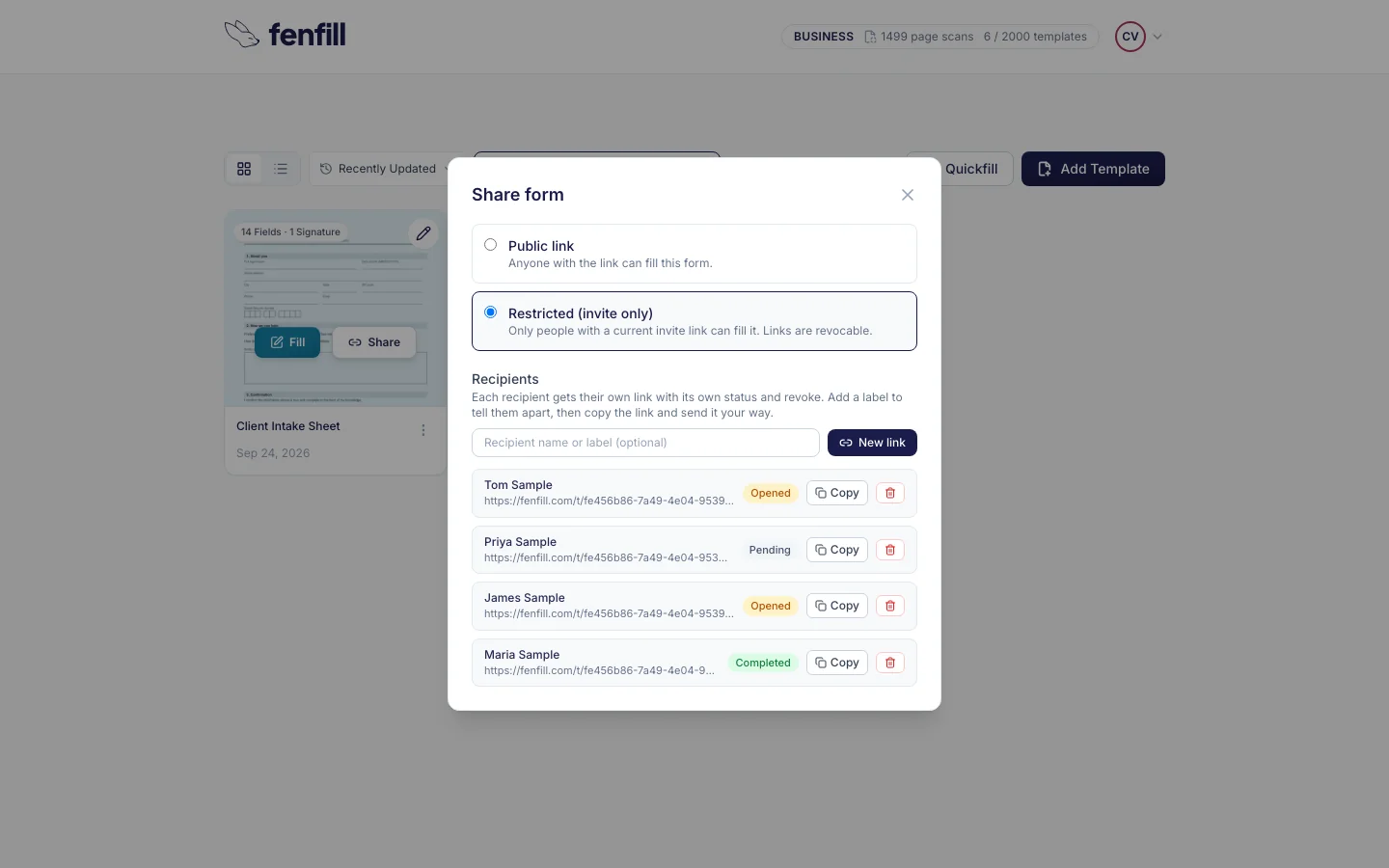
Completed means your client has downloaded the filled PDF. It doesn't mean the PDF has reached you: they still send it to you themselves. If a link says Completed and nothing has arrived, that's the moment to check in.
The status carries no content. fenfill learns only that a link was opened and when it was completed, plus an anonymous count of fills per form, never what your client typed. Here's what fenfill stores, and what it never does.
Public links don't show a status for each person, because no one person is behind them. When you need to know who has finished, send private links.
What comes back to you
When your client finishes, they download the filled PDF. It's the same document you uploaded, with their answers stamped on and flattened. They send it to you by email, or however they usually send you files, and fenfill shows you they've completed it.
Flattened means the answers are printed into the page itself, rather than left in form fields someone could edit. It's the kind of file many courts and portals ask for.
Because it's your original document, there's nothing to rebuild or retype on your side. It's the PDF you'd have gotten if your client had filled it by hand, only typed and easy to read. Keep the template, and the next client gets the same form, set up the same way.
If your client closes the tab halfway through, they don't lose their work. Their answers are saved on their own device, encrypted, and cleared after they download the PDF or after 30 days of inactivity. When they open the link again on the same device, they pick up where they left off.
fenfill doesn't file or submit anything on your behalf. The finished form is in your hands, to file, forward or keep the way you always have.
Sometimes you already have the answers, say your clients' details in a spreadsheet, and there's nothing to send. Fill from data fills your form once for each row of a CSV file or a pasted table and gives you one finished PDF per row. Like filling, it happens in your browser, so the rows never reach our servers. How many rows one batch can hold depends on your plan: compare plans.
What's coming next
A few things people ask for aren't here yet. We'd rather say so now than have you find out after you've sent your first link.
- Reminders: an email to clients who haven't finished yet Coming soon
- Link expiry: links that stop working on a date you set Coming soon
Until then, you follow up yourself, and the status list shows you exactly who to follow up with. When any of these arrives, this page will say so.