
Your own tax organizer, filled online by every client, every season
Keep the organizer your clients already recognize. Upload it once, and fenfill finds the fields; you fix any it missed with the wand. Send each client their own link, see who has completed it, and get the filled PDF back. Next season, send the same template again.
5 min readUpdated

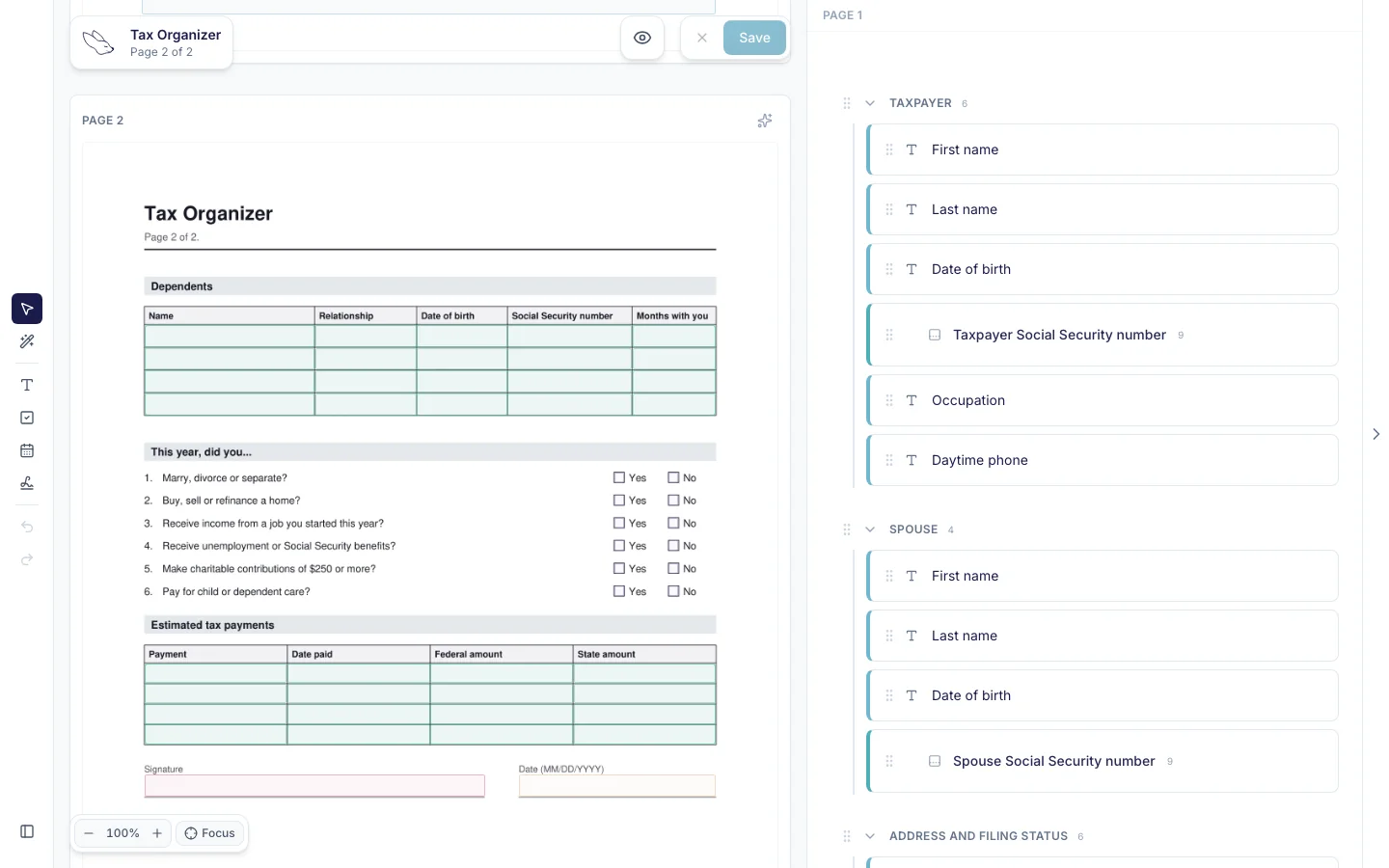
- Upload the organizer PDF you already use. fenfill finds the fields, and you fix any it missed with the wand.
- Save it as a template and send it again every season.
- Each client gets their own private link (Pro and up), and you see who has completed it.
- Clients fill it on a phone or a computer, and what they type never reaches our servers.
Every season, the same organizer and the same chasing
Tax season starts the same way every year. The organizer goes out, and then the chasing starts: going back and forth with clients, reminding the same people twice, feeling like a nag. The organizer itself isn't the problem. Your clients know it, and it asks what you need to know.
The problem is how it travels. A PDF sent by email often needs a desktop reader to fill, so on a phone it gets printed, filled with a pen and scanned back, or it sits unopened. And some clients don't like emailing their tax details at all.
Your clients know your organizer. Keep it, and change only how it gets to them and back.
The usual answers change the organizer instead. One is to rebuild it as a questionnaire in someone else's software, so your clients see a new form, not yours. The other is placing fillable fields by hand in a desktop PDF editor before each season, because its automatic detection misses fields on flat forms. Either way, the work lands on you or on your clients, every season.
fenfill keeps the organizer and changes how it travels. You upload your PDF, each client fills that same page online, and the filled PDF comes back to you. It's one of the forms people collect from clients that fenfill is built for.
Set it up once, send it every season
Organizers are long and dense, which is why placing their fields by hand takes so long. fenfill uses AI to find the fields on flat and scanned pages, and it runs only when you choose, on the pages you pick. Dense or scanned pages may need a few fixes with the magic wand: draw a rough box and it snaps to the line. Organizers that already have fillable fields skip detection entirely: fenfill reads those fields as they are.
An organizer is mostly checkboxes, dates, tables and short answers, with room for a longer note here and there. Those are all field types in fenfill, multi-line text included.
How it works
Your organizer, as a link
Once per season, not once per client.

- 1
Upload your organizer
fenfill finds the fields, or reads them directly if it's already fillable. Fix any with the wand.
- 2
Save it as a template
Next season, send the same one, or upload the new year's version.
- 3
Send each client their own link
They fill it, download the filled PDF and send it to you. You see Completed.
Private links give each client their own link, which you can label with their name, and you can revoke one at any time. A private link works for whoever holds it, so send each one only to its client. They come with Pro and up: see the plans with private links.
Each link shows whether it's pending, opened or completed, so the list tells you who to follow up with. When a client finishes, they send you the filled PDF by email, or however they usually send you files. Here's how sending and status work.
When a new year's organizer comes out, upload that version as a new template and send it instead. Revoke any private links to last year's version you no longer want open.
Engagement letters and the rest of the client packet
The organizer is one piece of the packet. Engagement letters, new-client questionnaires and authorization forms like Form 8821 and Form 2848 can each become a template the same way, set up once and sent to every client who needs it.
Your own layout matters as much here as in the organizer. A client who sees your firm's familiar letter, not a generic questionnaire, knows what they're reading and who sent it. Signature fields let clients sign it on screen, by drawing a signature, typing it or uploading an image of it.
Each form is its own template, filled on its own page, so a packet means a link for each form. Here's how to turn a PDF into a template, and how the same works for onboarding forms like W-9s.
What your clients see
The link opens in their browser, on a phone or a computer, with no app to install and no account to create.
They see your organizer, page by page, and tap a field to type or tick a box, with no pinch and zoom. A table, like the list of dependents, fills one cell at a time on the page itself.
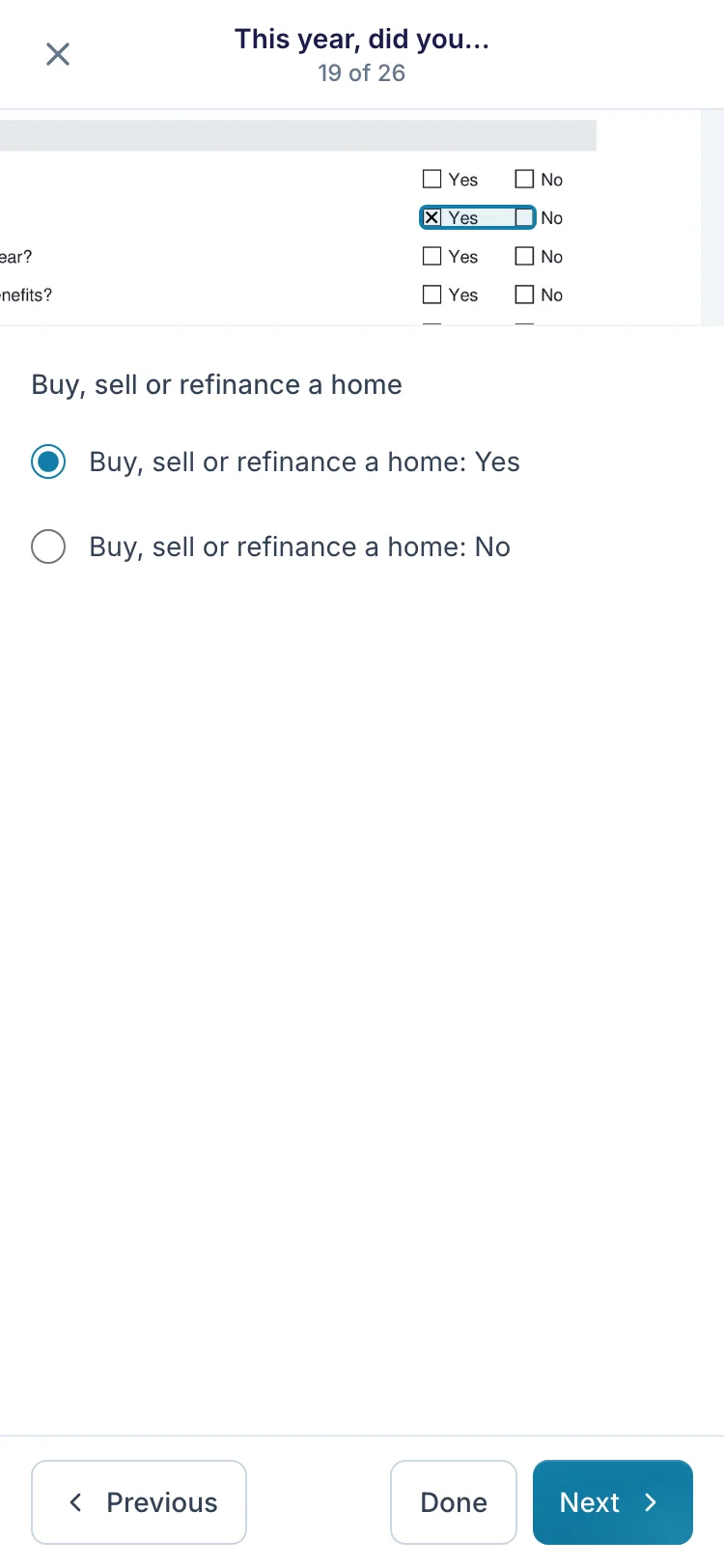
That means the organizer can go out when it suits you, and clients can fill it when it suits them: on the couch, between meetings, on a lunch break. No trip to your office and no borrowed computer.
A long organizer rarely gets done in one sitting. If a client stops partway, their answers are saved on their own device, encrypted, until they download the filled PDF or for 30 days of inactivity. That save stays on the device they started on, so it won't follow them from their phone to their laptop. There's more on filling on a phone.
What fenfill doesn't do yet
fenfill does one job: your organizer, filled by the client and back with you. It doesn't carry last year's answers forward. Each season, the client fills a fresh copy of your template. We'd rather say that plainly now than have you find out in February.
Clients can't upload documents through the form, either. There's no upload field for statements or receipts, so those still reach you the way they do today.
fenfill doesn't send reminders yet Coming soon. Until it does, the status on each private link shows who hasn't completed the organizer, and you can follow up yourself.
It isn't case-management software, and it doesn't turn one questionnaire into many forms. It gets your own forms filled and back to you, and leaves the rest of your workflow as it is.
Client tax data stays off our servers
An organizer collects Social Security numbers, income, bank details and dependents' names. Some clients hesitate to email any of it, and they're right to think about where it goes.
Filling and PDF stamping run in the client's browser, which is why their answers never reach us. That isn't a setting you have to find, and it applies on every form you send, from the organizer to the engagement letter.
The blank organizer you upload is encrypted in your browser before upload, with a new key for each file. Your documents are stored in the EU, in Stockholm, and processed in Helsinki. The security page covers the exceptions, like payments, field detection and the network that delivers the site.
fenfill runs no analytics, ad or tracking scripts, and no session recording. For the full picture, read how fenfill handles your data.