
Send your onboarding forms as a link and get the same PDF back
Your W-9 requests, intake sheet and direct-deposit form already exist as PDFs. Send each one as a link instead of an attachment. Clients and vendors fill it on a phone or a computer, the answers land on your original page, you see who has completed it, and the filled PDF comes back to you.
6 min readUpdated

- Send the onboarding PDF you already use, like a W-9, intake sheet or engagement letter, as a link. Nothing is rebuilt.
- One private link per client or vendor (Pro and up), and you see who has opened it and who has completed it.
- They fill it on a phone or a computer, with no app and no account.
- They download the filled PDF and send it to you. What they type never reaches our servers.
Chasing W-9s and intake sheets by email
Most onboarding paperwork already exists as a PDF: the W-9 you request from every vendor, your new-client information sheet, a direct-deposit form, an engagement letter. Getting each one filled in and back is where the time goes. You email it, wait, follow up, and follow up again.
On the other end, the PDF often isn't fillable, or it needs a desktop reader the person doesn't have on their phone. So they download it, print it, sign it, scan it and send it back. What arrives is a crooked scan with handwriting you have to read, and often retype.
The form already exists; the part that's broken is getting it back. The usual fix is to rebuild the form in a form builder. That means re-creating a document you already have, question by question, and what comes back is answers to a new web form, not your document.

fenfill takes another route. You send the PDF itself, as a link. The person fills your original page and signs it on screen, with no printer and no scanner, and the same document comes back to you.
fenfill is built for people who collect forms from clients: accountants, agencies, contractors, anyone who sends the same paperwork to every new client or vendor. If that's you, the sections below are the whole workflow.
One link per client or vendor, and you see who has completed it
You set a form up once, and that's the only part that takes your time. Upload the PDF and fenfill gets its fields ready. Many official PDFs, the IRS W-9 for one, already have fillable fields, and fenfill reads those directly. On a flat form, you run field detection on the pages you pick, fix anything with the wand, and save it as a template you reuse.
- 1
Upload your PDF
The form you already use, as it is.
- 2
Get the fields ready
fenfill reads the fields or finds them. Fix any with the wand.
- 3
Send each person their own link
One private link per client or vendor.
- 4
Get it back
They fill it, download it and send it to you. You see Completed.
Then choose how to send it. A public link suits a form anyone may fill, like a vendor form linked from your website: anyone who has the link can open it. For clients and vendors you know, private links give each person their own link, which you can label so you know whose it is, and you can revoke one at any time. A private link works for whoever holds it, so send each one only to its person.
Each private link shows whether it's pending, opened or completed, so you know who to follow up with without searching your inbox. Private links come with Pro and up: see the plans with private links.
When the person finishes, they download the filled PDF, the same document with their answers stamped on and flattened, and send it to you by email, or however they usually send you files. fenfill shows you it's completed. Here's how sending and status work.
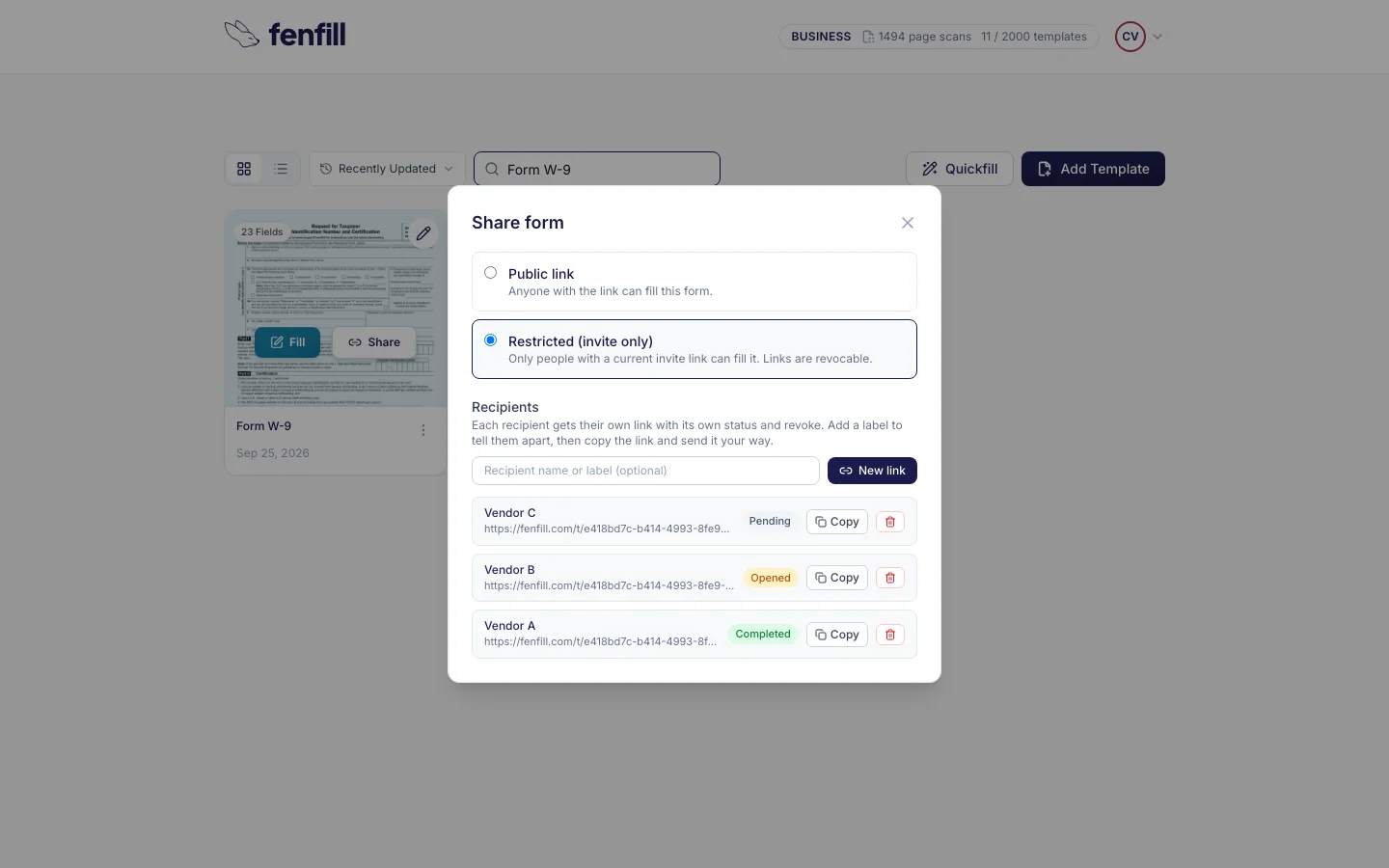
fenfill doesn't send reminders yet Coming soon. For now, the status list shows who hasn't completed the form, and you can follow up yourself.
The onboarding forms you already use
Start with the forms you send to everyone: the W-9, W-8BEN and W-8BEN-E, the W-4, a direct deposit or ACH authorization, a credit card authorization. Then add your own paperwork, like the new-client information sheet and the engagement letter you already use. Most businesses send the same handful of forms to everyone, so a few templates cover most of the paperwork a new client or vendor sees.
The field types cover what these forms need: text, checkboxes, dates, signatures, tables, and comb boxes that hold one character each, like the boxes for a tax ID. Scans and crowded pages may need a few fixes with the wand, so check each page once before you send it. Here's how to turn your PDF into a template.
| Rebuild it in a form builder | Email the PDF | Send it with fenfill | |
|---|---|---|---|
| What they fill | A new web form, not your document | Your PDF | Your original PDF page |
| Setting it up | Every question re-entered by hand | Nothing to set up | Once; fields found for you |
| What they need to fill it | A browser | Often a desktop PDF reader | A browser, on a phone too, no app |
| Who has completed it | Depends on the tool | Your inbox is the list | Shown for each private link |
| What comes back | Answers to the new form, not your PDF | Your PDF, if they manage to fill and send it | The same PDF, filled, sent to you by them |
What they fill
- Rebuild it in a form builder
- A new web form, not your document
- Email the PDF
- Your PDF
- Send it with fenfill
- Your original PDF page
Setting it up
- Rebuild it in a form builder
- Every question re-entered by hand
- Email the PDF
- Nothing to set up
- Send it with fenfill
- Once; fields found for you
What they need to fill it
- Rebuild it in a form builder
- A browser
- Email the PDF
- Often a desktop PDF reader
- Send it with fenfill
- A browser, on a phone too, no app
Who has completed it
- Rebuild it in a form builder
- Depends on the tool
- Email the PDF
- Your inbox is the list
- Send it with fenfill
- Shown for each private link
What comes back
- Rebuild it in a form builder
- Answers to the new form, not your PDF
- Email the PDF
- Your PDF, if they manage to fill and send it
- Send it with fenfill
- The same PDF, filled, sent to you by them
A form builder is a good fit for a brand-new questionnaire. For a document that already exists, and one you need back as that document, sending the PDF itself skips the rebuilding and the retyping. You also keep the layout people recognize, down to the boxes on the IRS's own form.
The template stays in your account, so the next client or vendor gets the same form, already set up. When the IRS or your bank updates a form, upload the new version as a new template and revoke the private links to the old one.
What the person on the other end sees
The link opens in their browser, on a phone or a computer. They don't need an app or an account, and they don't need to know anything about PDF readers.
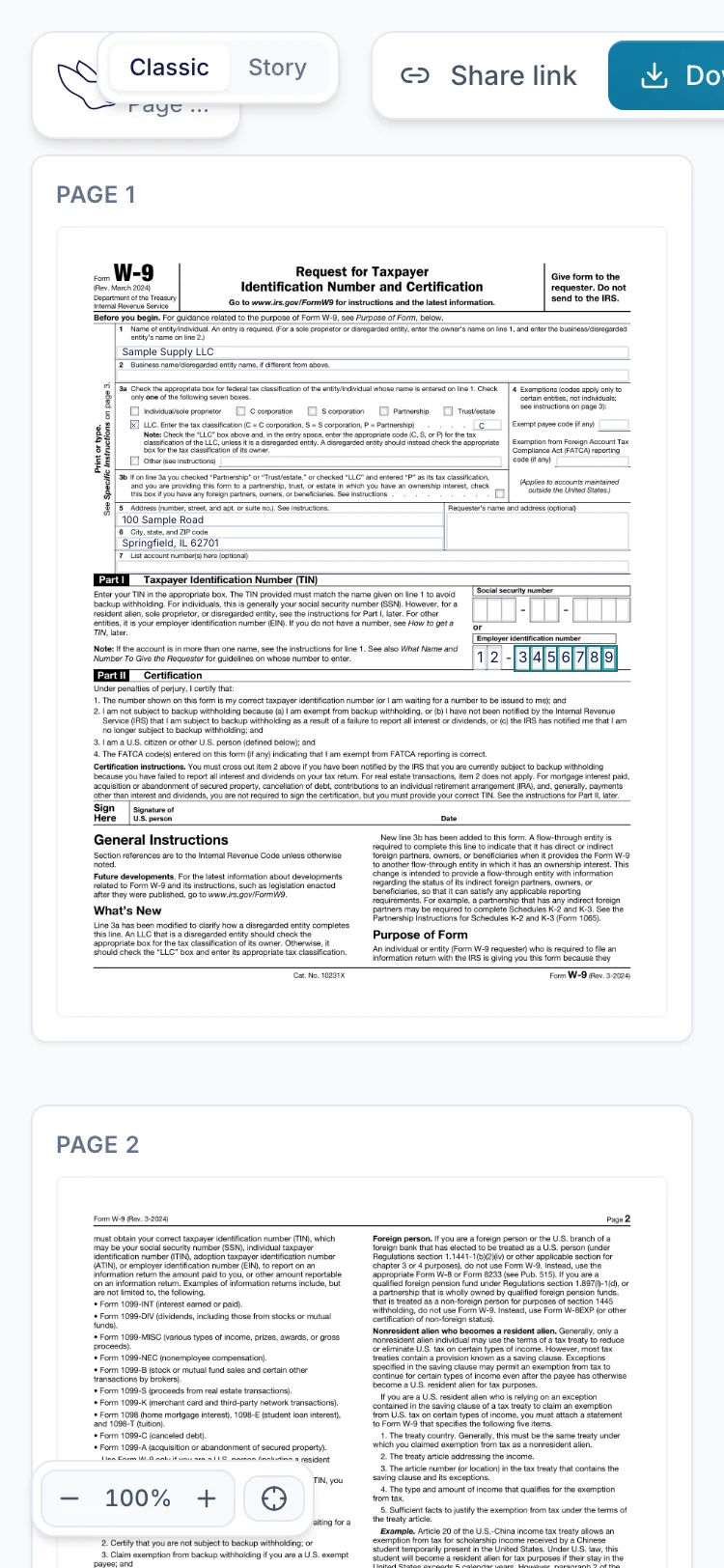
They tap a field and type, with no pinching and zooming to find the box. On a phone the form opens one section at a time, with your original page one tap away. A tax ID goes into comb boxes one character at a time, the way it would on paper, once you've set it as a comb field. On a W-9, fenfill reads the tax-ID box as a text field, and you switch it to comb boxes in the editor. Dates and checkboxes work the same way, and every answer lands on your page.
If they stop halfway, their answers are saved on their own device, encrypted, and cleared once they download the filled form or after 30 days of inactivity. When a form needs a signature, they draw it, type it or upload an image of it. There's more on filling on a phone.
What they can't do is attach files. There's no upload field, so a copy of an ID or a voided check still reaches you the way it does today. They fill the form itself, and you can ask for any attachments in the same message you send the link in.
Tax IDs and bank details stay off our servers
Onboarding forms carry the numbers people are most careful with: tax IDs, bank account and routing numbers, card details. Emailing those back and forth leaves copies in inboxes on both sides. Your clients and vendors know that, and a form that asks for a routing number by email makes some of them hesitate.
That holds on every form you send. What the person types stays with them until they send you the filled PDF themselves.
The blank PDF you upload is encrypted in your browser before upload, with a new key for each file. Your documents are stored in the EU, in Stockholm, and processed in Helsinki. Field detection runs on Google's Gemini, which may process page images outside the EU.
You sign in with your Google or Microsoft account, so fenfill has no password of yours to store. For the full data flow, including the exceptions like payments and the network that delivers the site, read how fenfill handles your data.
Not for Form I-9
One scope note: fenfill isn't built for Form I-9. Use it for the rest of your onboarding packet.