
Any carrier's supplemental application, filled by the insured on their phone
Supplementals arrive as the carrier's own PDF, and most of them were never meant for a phone. Upload the one you need, even if no library has it. fenfill finds the fields, the insured fills that exact form in a browser, and the filled PDF comes back to you.
5 min readUpdated


- Upload any carrier's supplemental application, even one no library has, and fenfill finds the fields.
- The insured fills the carrier's exact form on a phone, with no app and no account.
- One private link per insured (Pro and up), and you see who has completed it.
- The filled, flattened PDF comes back to you, ready to send on to the carrier.
- What the insured types never reaches our servers.
The carrier's own PDF, and nobody wants to fill it
Every new risk seems to come with its own supplemental: one for the restaurant, another for the contractor, another for cyber coverage, each on the carrier's own PDF. Some are fillable. Many are flat pages made for a pen. Underwriters want the details, and the details live on those pages. Either way, someone has to get it filled in by the insured.
That's where the time goes. You call and take the answers down on paper, or you email the PDF and wait. The insured complains about having to do the work, sends back a scan, and someone at the agency ends up re-entering the data. If your software has a forms library, the form you need today is often the one that's not in the library.
fenfill starts from the carrier's PDF itself. The insured fills that exact page online, and the filled form comes back to you. Nothing is rebuilt, and nobody at the agency retypes the answers. It's built for people who collect forms from clients, and an independent agency collects a lot of one-off forms.
Any supplemental, ready to send
Upload the PDF the carrier gave you. If it already has fillable fields, fenfill reads them directly. If it's flat or scanned, you run field detection on the pages you pick, and fenfill uses AI to find the fields.
Dense or scanned pages may need a few fixes. Draw a rough box with the magic wand and it snaps to the line or box on the page, then adjust the field's type or size in the editor. Most of the setup is checking, not building.
Supplementals are made of the things fenfill already handles: yes/no questions as choice groups, checkboxes, dates, signatures, multi-line answers for the descriptions underwriters ask for, and tables for lists of locations or vehicles.
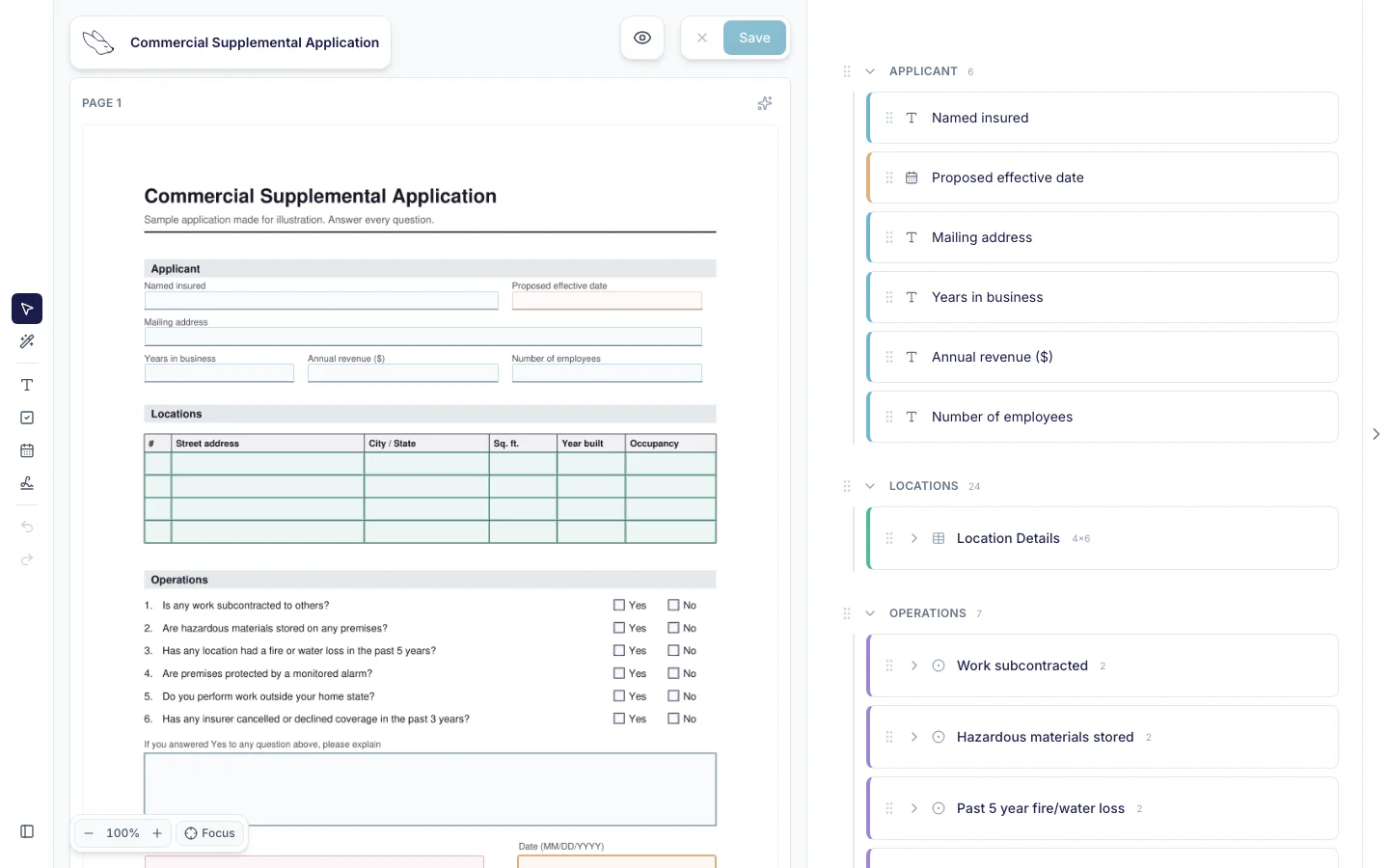
Check each page once before you send it, the way you'd proofread a letter. If detection skipped a field entirely, draw it where the answer goes and choose its type. It becomes part of the template like any other field.
Save it as a template, and it's ready for every insured with that type of risk, and again at renewal. You set it up once, not once per insured. Here's how a PDF becomes a template.
One link per insured, and you see who has completed it
Each insured gets their own private link, which you can label so you know whose it is. You can revoke it at any time, and it shows whether it's pending, opened or completed. With a stack of open applications, that list is the difference between knowing and guessing.
- 1
Upload the supplemental
The carrier's PDF, as it is.
- 2
Check the fields and save the template
Fix anything with the wand, once.
- 3
Send the insured their own link
One private link per insured.
- 4
Get it back
They fill it, download it and send it to you. You see Completed.
A private link works for whoever holds it, so send each one only to its insured. Revoking a link stops that person opening the form again. Private links come with Pro and up: see the plans with private links.
When the insured finishes, they download the filled PDF: the carrier's form with their answers stamped on and flattened. They send it to you by email, or however they usually send you files, and fenfill shows you it's completed. Here's how sending and status work.
fenfill doesn't send reminders yet Coming soon. For now, the status list shows who hasn't completed the application, so you know who to call. One call to the insured still showing Opened beats another round of emails to everyone.
Filling it on a phone
The link opens in the insured's browser. There's no app to install and no account to create, whether they're at a desk or on a job site. They don't need a printer, a scanner or a desktop PDF reader.
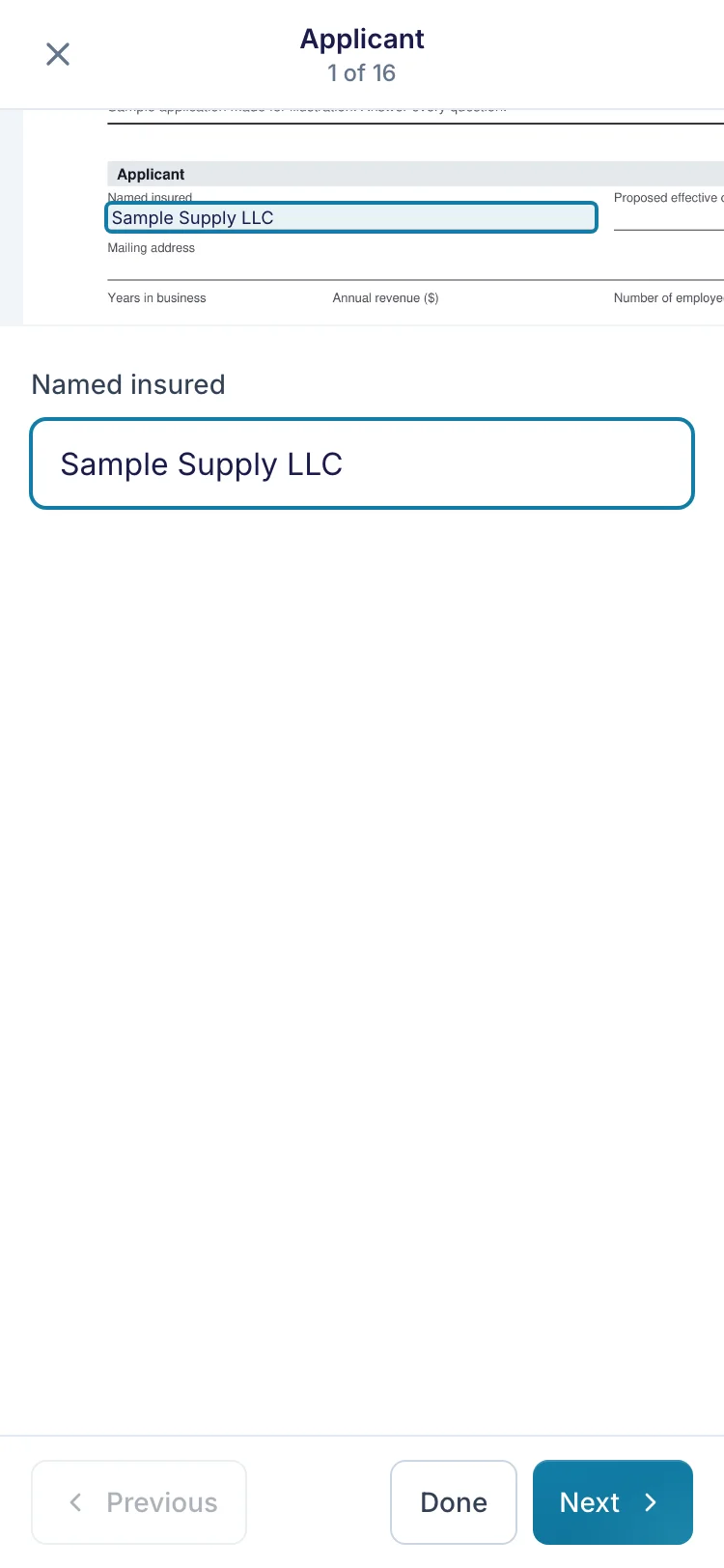
They see the carrier's page and tap a field to type or a box to tick, with no pinching and zooming around a dense page. If they stop halfway, their answers are saved on their own device, encrypted, until they download the filled form or for 30 days of inactivity.
When the application needs a signature, they draw it, type it or upload an image of it. There's more on filling on a phone.
Who fills in the application, you on a call or the insured on their own, is your agency's call. fenfill works either way: you can open and fill your own template yourself, too. If you're taking the answers on a call, you type as the insured talks, and you download the same filled PDF at the end.
Renewals, and what fenfill doesn't do
At renewal, send the same template again, or upload the carrier's new version if the form has changed. The setup you did last year is still there.
fenfill does one job: the carrier's form, filled by the insured and back with you. It doesn't carry last year's answers forward, so at renewal the insured fills a fresh copy.

It doesn't rate, quote or submit applications to carriers, either. Sending the application on stays with you. And the insured can't attach files: there's no upload field, so loss runs and photos still reach you the way they do today.
If your agency already has software for rating and submissions, keep it. fenfill handles the part before that: getting the carrier's form filled by the insured. That's the whole list. We'd rather you know it before you send the first link than find out halfway through a renewal season.
Privacy for the insured's information
A supplemental asks for things a business doesn't share lightly: revenue, payroll, loss history, addresses of every location. Emailing that back and forth leaves copies in inboxes on both sides. The fewer copies there are, the fewer there are to lose.
Filling and PDF stamping run in the insured's browser on every form, which is why their answers never reach us. That isn't a setting you have to find, and it applies to every form you send, from a supplemental to a renewal questionnaire.
The blank supplemental you upload is encrypted in your browser before upload, with a new key for each file. Your documents are stored in the EU, in Stockholm, and processed in Helsinki. The security page covers the exceptions, like payments, field detection and the network that delivers the site.
One scope note: fenfill isn't built for health or benefits forms. Our security page sets out what we don't claim.