Not affiliated with HMRC
SA102: Self Assessment employment pages (2025 to 2026)
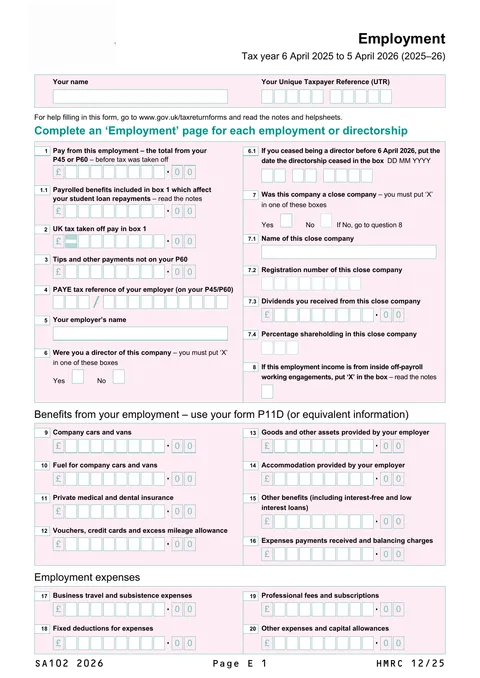
The SA102 'Employment' pages are supplementary pages to the SA100 tax return. You use them to report pay, tax taken off, benefits and expenses from each job or directorship for the tax year 6 April 2025 to 5 April 2026.
HM Revenue & Customs · Edition shown: SA102 2026 (HMRC 12/25) · 2 pages
fenfill is a private company. This page is not run by, affiliated with, or endorsed by HM Revenue & Customs. You can get the blank form from HMRC directly. You file it with HMRC yourself and pay any fee directly to them. fenfill never sees what you type.
HMRC also has an online route: File your Self Assessment tax return online.
This page is general information, not legal, tax or immigration advice, and not a substitute for advice from a qualified professional.
Who uses SA102
SA102 is not a return on its own. It is a set of supplementary pages that go with the main SA100 Self Assessment tax return. HMRC's notes say to fill them in if you work for an employer who deducts tax through PAYE, were a company director, held an office such as chairperson, secretary or treasurer and were paid for it, worked for one person through another company or partnership, or received foreign income from a job, directorship or office.
Use a separate Employment page for each job, directorship or office you held in the year. If you were a sub-contractor in the construction industry, that income goes on the Self-employment pages instead.
How and where to send it
You can file your Self Assessment tax return online, where employment is one of the sections of the online return, so you do not need the paper SA102. To file online for the first time you must register for Self Assessment, and you will need your Unique Taxpayer Reference (UTR).
If you file on paper, complete one SA102 for each employment and send it with your SA100 tax return. Use the figures on your P45 or P60 for pay and tax, and your P11D for benefits and expenses that were not payrolled.
Fees
HMRC works out the tax you owe from what you report. You may have to pay interest and a penalty if you do not file and pay on time.
If your return is late, the penalties are £100 at first, then £10 a day after 3 months (up to £900), then 5% of the tax due or £300, whichever is greater, after 6 months and again after 12 months.
Deadlines
For the 2025 to 2026 tax year, HMRC must receive a paper tax return by 11:59pm on 31 October 2026. An online return must be submitted by 11:59pm on 31 January 2027.
You must pay the tax you owe by 11:59pm on 31 January 2027. If you want the bill collected through your tax code, submit your online return by 11:59pm on 30 December 2026.
If you register for Self Assessment after 5 October 2026, HMRC will give you a different filing deadline, 3 months from the date of its letter or email.
Common mistakes
- Putting more than one job on a single page. Each employment, directorship or office needs its own Employment page.
- Copying pay and tax figures without checking them against your P45 or P60. Payments or benefits you got after your employer issued the P45 or P60 also go in box 1.
- Missing the minus sign. If the tax on your P60 has an 'R' next to it, put a minus sign in the shaded box in front of your figure in box 2.
- Entering payrolled benefits in boxes 9 to 20. If your employer taxed your benefits through your pay, they are already in your P60 and should not be entered again.
- Putting foreign tax in box 2, which is for UK tax taken off your pay only.
- Including employment lump sums or compensation payments in box 1. These go on the SA101 'Additional information' pages.
HMRC's own instructions
About this copy
- Form
- SA102: Self Assessment: Employment (SA102) 2026
- Issuer
- HM Revenue & Customs
- Edition shown
- SA102 2026 (HMRC 12/25)
- Source
- The blank PDF on assets.publishing.service.gov.uk
- Last checked
- Against the issuer's site on
fenfill added the fill-in fields; the form itself is unchanged, and the PDF you download has nothing added to it. Check the edition and your answers before you send it.
Contains public sector information licensed under the Open Government Licence v3.0.